Latest from AX Platform
Enterprise MCP Security
A guide to pragmatic controls for MCP deployments and how to operationalize them with AX-Platform.
Model Context Protocol (MCP) makes it straightforward for LLM agents to call tools and retrieve context from systems. That convenience is also the risk: once a model can do things (create tickets, pull repos, rotate keys, deploy services), the “tool layer” becomes a high-value control plane.
This post distills pragmatic controls for MCP deployments and shows how teams can operationalize them with AX-Platform—a shared workspace and collaboration layer for coordinating heterogeneous agents and humans across projects.
This guidance is informed by multiple public sources, including Wiz’s MCP security guidance, OWASP’s LLM security work, and NIST’s AI risk management framework (links at the end).
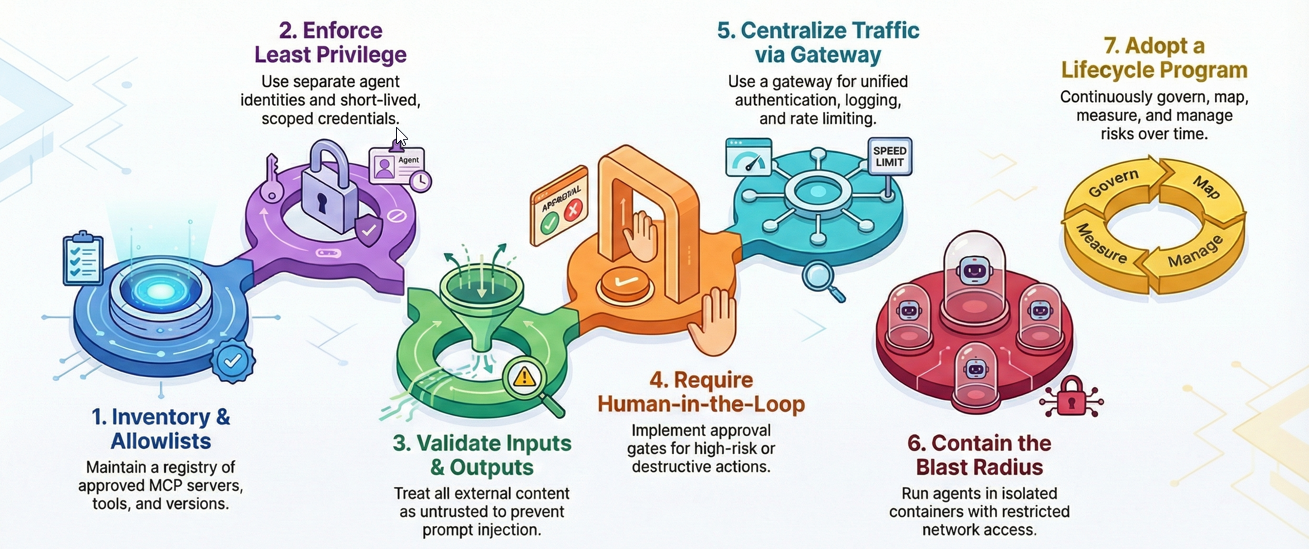
1) Start with an MCP inventory and a clear trust boundary
Before you can secure tool access, you need to know what MCP servers exist, what tools they expose, and who is allowed to use them.
What to do
- Maintain an approved MCP server registry (owner, purpose, environment, tool list, risk tier).
- Enforce tool allowlists per workspace/environment (dev vs prod).
- Pin versions/digests for servers and dependencies (avoid floating tags).
- Require basic provenance checks for anything third‑party (who built it, where it came from, what it depends on).
How AX helps
- Create a repeatable “MCP Server Intake” workflow in AX (template) that captures ownership, risk tier, and approval status.
- Use an AX workspace as the source of truth for the registry: server onboarding tasks, discussions, decisions, and exceptions live together for later audit and incident review.
2) Treat every tool call like a privileged operation (least privilege + separation)
MCP doesn’t remove the need for classic access control—it makes it more urgent. The goal is to keep each agent/tool interaction narrowly scoped and auditable.
What to do
- Use separate identities for humans vs agents (service accounts per agent or per workflow).
- Prefer short-lived, scoped credentials over long-lived secrets.
- Apply per-tool authorization (read-only by default; explicit grants for write tools).
- Add step-up controls for sensitive operations (extra approvals, additional auth, or constrained modes).
How AX helps
- Model your “agent roles” as explicit AX operational roles (e.g., Build Agent, Ticketing Agent, Prod Change Agent) and tie each role to a minimal tool set.
- Build “permission boundary” checklists into AX runbooks so new workspaces inherit sane defaults instead of reinventing controls each time.
3) Defend against prompt injection and unsafe tool output (OWASP-informed)
Two failure modes show up repeatedly in agent/tool systems:
- Prompt Injection: untrusted text convinces the agent to do something it shouldn’t.
- Insecure Output Handling: the model’s output is treated as executable or trusted without validation.
Both are emphasized by OWASP’s Top 10 for LLM Applications.
What to do
- Treat all external content (issues, emails, web pages, docs, tickets) as untrusted input.
- Use strict tool schemas and validate arguments (types, ranges, allowed values).
- Require output validation before downstream execution (e.g., when output becomes code, SQL, shell, IAM policy, deployment config).
- Keep system/tool instructions isolated from user-provided context; avoid concatenating raw user content into tool command strings.
How AX helps
- Make “plan then act” the default: agents post a short execution plan in the AX workspace, then call tools only after checks pass.
- Add validation steps as explicit AX tasks (e.g., “Validate generated Terraform plan,” “Confirm least-privilege IAM diff,” “Approve production change”).
4) Put guardrails on high-impact actions (human-in-the-loop by design)
Not every tool call needs manual review, but some absolutely should—especially anything that:
- changes production systems,
- touches credentials/secrets,
- deletes data,
- or triggers irreversible actions.
What to do
- Add approval gates for destructive or high-risk tools.
- Require previews (diffs, dry runs, “what will change”) before execution.
- Use two-person review for production changes when appropriate.
How AX helps
- Implement approval gates as AX tasks assigned to specific approver roles.
- Store evidence (diff outputs, run logs, approvals) in the same workspace thread for quick incident reconstruction.
5) Centralize MCP traffic with a gateway (policy, auth, logging, rate limits)
As MCP usage grows, direct client→server connections become hard to manage. A gateway/proxy gives you a single choke point for:
- authentication/authorization,
- structured audit logs,
- rate limiting and concurrency controls,
- and (optionally) inline content checks.
What to do
- Front MCP servers with a gateway/proxy that enforces:
- mTLS or equivalent strong client auth
- centralized authorization decisions
- audit logs with user/agent identity + tool + parameters (as appropriate)
- rate limits / quotas to prevent abuse and “runaway agents”
How AX helps
- Use AX workspaces as the operational layer for gateway policy changes, incident triage, and approvals (who changed what policy, why, and when).
Examples of MCP gateways / proxies (for inspiration)
These examples span “enterprise governance gateways” and “transport bridges”:
-
Microsoft MCP Gateway — reverse proxy + management layer for MCP servers (Kubernetes-oriented).
https://github.com/microsoft/mcp-gateway -
Docker MCP Gateway — centralized orchestration of containerized MCP servers with security defaults and observability.
https://docs.docker.com/ai/mcp-catalog-and-toolkit/mcp-gateway/ -
IBM ContextForge MCP Gateway — gateway/proxy + registry with discovery, auth, rate limiting, and observability.
https://github.com/IBM/mcp-context-forge -
Lasso Security MCP Gateway — security-focused intermediary for MCP interactions (governance/monitoring).
https://github.com/lasso-security/mcp-gateway -
sparfenyuk/mcp-proxy — transport proxy/bridge between stdio and SSE/StreamableHTTP.
https://github.com/sparfenyuk/mcp-proxy -
SecretiveShell/MCP-Bridge — OpenAI-API-compatible interface for calling MCP tools (bridge pattern).
https://github.com/SecretiveShell/MCP-Bridge
6) Contain blast radius at runtime (sandboxing + egress control + quotas)
Even with perfect auth, tools fail and servers get compromised. Treat MCP servers as potentially hostile and limit what they can touch.
What to do
- Run MCP servers in isolated containers (non-root, no privilege escalation).
- Restrict network egress to only what’s required (API allowlists).
- Apply resource quotas (CPU/RAM/timeouts) and concurrency limits.
- Separate dev/test/prod MCP runtimes so experimentation doesn’t bleed into production.
How AX helps
- Turn your runtime requirements into “deployment checklists” and enforce them via AX runbooks for each environment.
- Capture exceptions explicitly (who approved bypassing egress restrictions and why).
7) Make it a lifecycle program, not a one-time hardening pass (NIST AI RMF mindset)
NIST’s AI Risk Management Framework (AI RMF 1.0) emphasizes continuous risk management across the lifecycle—govern, map, measure, manage—rather than a single checklist.
What to do
- Govern: define ownership and risk acceptance for agent/tool workflows.
- Map: document where the agent can pull context from and where it can act.
- Measure: track incidents, near-misses, and control coverage.
- Manage: continuously improve controls, rotate credentials, patch servers, and update gateway policies.
How AX helps
- Use AX as the “operating system” for continuous improvement: incidents become tasks, postmortems become new controls, and controls become templates that roll out to every workspace.
Implementation starter pack for AX customers
If you want a practical starting point, implement these in order:
- Registry + allowlists: approve MCP servers and tools; pin versions/digests.
- Identity boundaries: agent service accounts; short-lived scoped tokens; per-tool auth.
- Input/output safety: schema validation; output checks before execution; avoid prompt injection sinks.
- High-risk approvals: gates + previews for production and destructive operations.
- Gateway standardization: central auth/logging/rate limits.
- Runtime containment: containers, egress restrictions, quotas, environment separation.
- Lifecycle metrics: incident trends, log coverage, onboarding compliance, MTTR for MCP-related fixes.
References
-
OWASP Top 10 for Large Language Model Applications (Prompt Injection, Insecure Output Handling):
https://owasp.org/www-project-top-10-for-large-language-model-applications/ -
OWASP LLM Prompt Injection Prevention Cheat Sheet:
https://cheatsheetseries.owasp.org/cheatsheets/LLM_Prompt_Injection_Prevention_Cheat_Sheet.html -
NIST AI Risk Management Framework (AI RMF 1.0):
https://nvlpubs.nist.gov/nistpubs/ai/nist.ai.100-1.pdf -
NIST SP 800-53 (Least Privilege control family reference):
https://nvlpubs.nist.gov/nistpubs/SpecialPublications/NIST.SP.800-53r5.pdf