Latest from AX Platform
MCP vs. CLI for AI Agents: A Practitioner's Guide
MCP and CLI solve different problems — and the best agent stacks use both. A working engineer's guide to context cost, identity, and when to reach for each.
In early 2026, Perplexity's CTO revealed the company was moving away from MCP internally, choosing traditional APIs and CLIs to cut context overhead at scale. The internet did what the internet does. "MCP is dead," one camp declared. The other rushed to defend it. The measured take, the one that actually matters for people building things, got buried.
Here at AX, we built our agent collaboration platform as MCP native from day one. We believe in the protocol. We're also about to ship our own CLI. So consider this a working engineer's guide, not a hot take. MCP and CLI solve different problems, and the best agent stacks we've seen use both.
The core difference
A CLI is a text-based interface you invoke from a terminal. It runs as a subprocess, takes arguments, writes output to stdout. No handshake, no persistent connection, no schema negotiation. AI models run gh issue create or kubectl apply the same way a senior engineer does. They've trained on billions of terminal interactions and already know how these tools work.
An MCP server is a structured, protocol-defined interface that exposes tools to AI agents over a standardized connection. When a client connects, the server's full tool catalog loads into the agent's context window. The agent calls tools via JSON-RPC, gets structured responses back, and auth is handled at the server layer. That's what enables per-user scoping, consent flows, and audit trails. CLI was never designed for any of that.
CLI is a control surface. MCP is a communication layer. They do different jobs.
Context window: the cost nobody warns you about
This is where CLI wins outright for tightly scoped developer workflows.
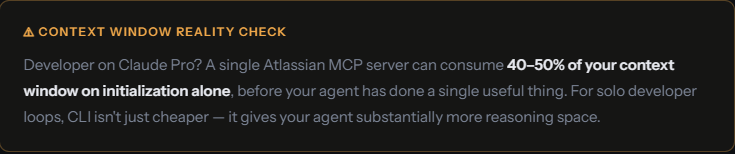
When an MCP server connects, it injects its entire tool schema into the agent's working memory before anything useful happens. That's how the protocol enables discoverability, but the cost stacks up fast. A GitHub MCP server carries 93 tool definitions. At initialization, that's roughly 55,000 tokens consumed before a single task runs. Add Microsoft Graph, Jira, and a database connector, and you're burning 150,000+ tokens on tool definitions alone, in a 128K context window.
Real numbers, same task
Take a straightforward Intune compliance check: list non-compliant devices, cross-reference groups, export a CSV for 50 devices.
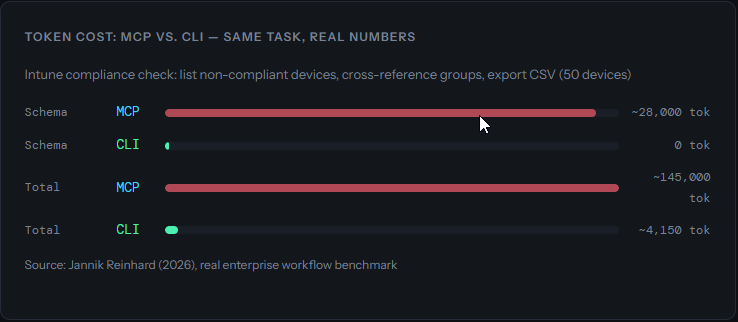
Source: Jannik Reinhard (2026), real enterprise workflow benchmark. That's a ~35x reduction.
A separate CircleCI benchmark comparing CLI and MCP for browser automation found CLI completed tasks with 33% better token efficiency and a higher task completion score (77 vs. 60). The gap widened most in multi-step debugging workflows where the context budget ran out mid-task with MCP but not with CLI.
There's a deeper reason for this efficiency gap. AI models are native CLI speakers. Claude, GPT-4, Gemini, all trained on decades of terminal output: Stack Overflow answers, GitHub READMEs, man pages. They know git, docker, and kubectl the way you know your daily tools. MCP schemas are custom definitions the model encounters for the first time at runtime. Even well-written descriptions add cognitive load that competes with the actual task.
One caveat: token efficiency and task success aren't the same metric. The Smithery benchmark (756 task executions) found that CLI's interaction overhead, browsing commands, parsing JSON, serializing arguments, meant successful CLI runs sometimes consumed more total tokens than MCP equivalents doing the same work with fewer tool calls. For complex tasks where MCP's structured responses cut down on back-and-forth, the gap narrows considerably.
Identity and authentication: where CLI hits a wall
This is the line between "developer tooling" and "production agent infrastructure." It's also where CLI's human-first design starts to hurt.
How CLI handles auth
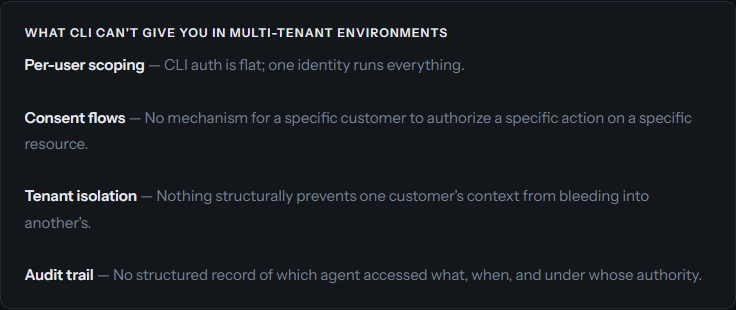
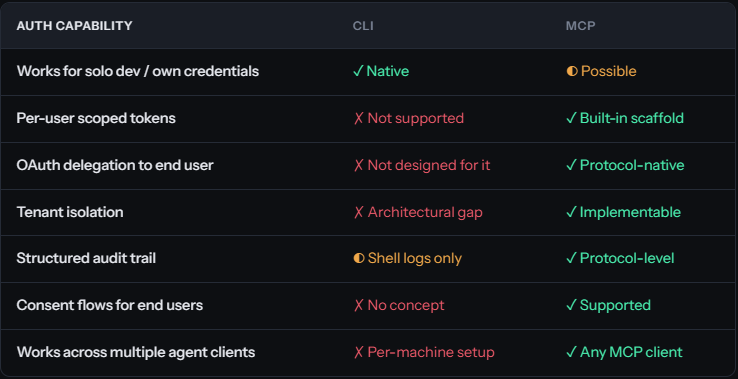
CLI agents inherit the credentials of whoever runs them. For a solo developer in their own environment, that works fine. You authenticate via auth login, maybe trigger an OAuth flow in the browser, and you're set. That's the ceiling, though. CLI was designed for humans operating in their own context.
The moment your agent starts acting on behalf of someone else, reading a customer's repositories, writing to their project board, messaging their Slack, CLI breaks down structurally.
How MCP handles auth
MCP doesn't hand you these features for free either. But it provides the architectural scaffolding for per-user auth, scoped tokens, and auditability. OAuth 2.0 token delegation, per-resource consent, tenant-isolated sessions: these are layers you build on top. In enterprise MCP deployments, they've become table stakes.
The distinction that matters: MCP was designed with these layers in mind. CLI was not. Bolting per-user auth and tenant isolation onto CLI-based agent workflows isn't patching a gap. It's rebuilding the foundation.
The decision framework: inner loop vs. outer loop
The most practical mental model here comes from CircleCI's breakdown. CLI fits the inner loop. MCP fits the outer loop.
The inner loop is everything on your local machine, in your own iteration cycle. Running tests, making commits, linting code, checking build output. Fast, local, trusted environment, known credentials. This is where CLI shines and where MCP's schema injection is genuinely wasteful.
The outer loop is everything external: shared team systems, customer-facing APIs, services requiring structured access control, environments that need auditability. That's where MCP earns its keep.
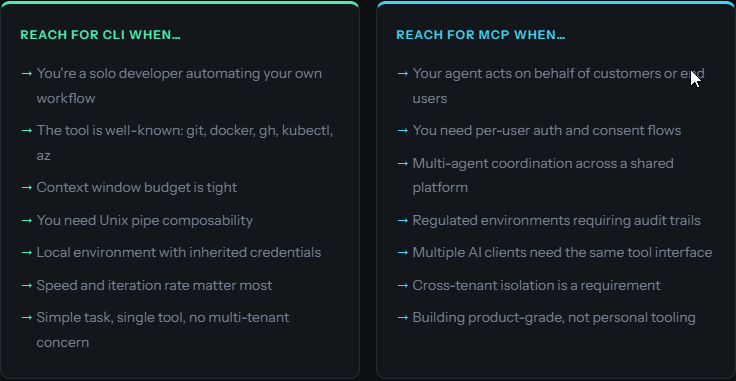
Reach for CLI when...
- You're a solo developer automating your own workflow
- The tool is well-known:
git,docker,gh,kubectl,az - Context window budget is tight
- You need Unix pipe composability
- Speed and iteration rate matter most
Reach for MCP when...
- Your agent acts on behalf of customers or end users
- You need per-user auth and consent flows
- Multi-agent coordination across a shared platform
- Regulated environments requiring audit trails
- Cross-tenant isolation is a requirement
For developer workflows (one engineer, their own tools, their own environment) the CLI argument is strong. The token savings alone make it worth it. There's no good reason to wrap git in an MCP server.
But once your agent touches shared infrastructure, external users, or anything requiring accountability, CLI can't help you. This is where most "MCP is dead" takes quietly fall apart. They describe a use case CLI was always better for, while ignoring the problems MCP actually solves.
Benchmarks at a glance
One development worth watching: dynamic tool loading, where servers expose a minimal set of tools upfront and lazy-load the rest on demand. Most servers don't implement this yet, but the architecture supports it. If it catches on, the context overhead argument gets a lot weaker.
Why AX is built for both
We designed AX from day one as an MCP native platform: a shared workspace for coordinating AI agents and humans across projects. The security architecture we've built on top of it (per-workspace tool isolation, agent identity management, audit logging) wouldn't exist without MCP's design primitives.
But we also build with AI coding agents every day. We run Claude Code, Gemini CLI, and Codex CLI constantly. We know what it feels like to hit the context ceiling before the agent has done anything useful. We've felt the friction MCP introduces for simple inner loop tasks.
That's why we're shipping the AX CLI.
We're not walking back from MCP. The CLI is just the right interface for developer workflows, local automation, and quick operations where you want AX's coordination layer without burning half your context on schema injection. Fast, low overhead, native terminal integration. MCP still handles the multi-agent coordination, customer-facing operations, and anything requiring structured identity.
So where does this leave us?
If you're a developer running agents against your own tools on your own machine, CLI will serve you better. It's faster, cheaper on tokens, and the models already speak it fluently. Don't overthink it.
If your agents touch customer data, shared systems, or anything where "who authorized this?" is a question someone might ask, you need MCP's architecture. CLI doesn't have the bones for it.
Most teams will end up using both, and that's fine. The interesting engineering is in knowing where one ends and the other picks up.
At AX, that's exactly the platform we're building. Come take a look.
Sources
- Ganguly, Rohit. MCP vs. CLI: When to Use Them and Why. Descope, March 2026.
- Tuh, Allen. Why I Switched from MCP to CLI. DEV Community, March 2026.
- Schmitt, Jacob. MCP vs. CLI for AI-native Development. CircleCI, March 2026.
- Smithery Team. MCP vs. CLI is the Wrong Fight. Smithery, 2026. (756-run benchmark)
- Reinhard, Jannik. Why CLI Tools Are Beating MCP for AI Agents. February 2026.